
Free AI Detector
for Teachers
An AI detector for teachers is a tool that scans student essays and assignments for text likely written by ChatGPT, Gemini, Claude or other AI models. Quetext scores each submission line by line, so you can see which passages look AI-generated, mixed or human.
Try it for FreeFree Online AI Detector By Quetext
How to check student work for AI in 5 steps
Paste the text or upload the file (.doc, .docx, .pdf).
Run the AI scan, or AI + plagiarism together.
Review the highlighted passages and the overall score.
Download the report or share the report within Quetext.
Compare with earlier work and talk with the student before deciding anything.

Preserve
Academic Integrity
AI tools can be helpful, but they also make it easy to skip over key learning moments. Quetext's AI detector helps educators spot where citations or deeper analysis might be needed, creating opportunities for discussion, not discipline.
Ensuring Ethical
AI Use
With over 86% of students use AI tools to assist with assignments. Quetext puts the power of AI in the hands of teachers as a tool to identify lack of originality in essays.
Promoting
Authenticity
Quetext highlights AI-generated content, helping you provide feedback that promotes critical thinking and authentic expression, encouraging students to refine their ideas and develop their unique voices.
Check a whole class at once with Bulk Scan
Grading 30 essays? Upload up to 100 files in one go and run AI detection, plagiarism checking, or both. Results come back per student, so you can spot the submissions that need a closer look before you start grading.

How to read your AI score
Every Quetext scan splits the text into three scores that always add up to 100%:
AI score
The share of the text likely written entirely by AI. This is the number to focus on.
Mixed
The share that blends AI and human writing, such as an AI draft the student edited or text run through a paraphrasing tool.
Human
The share likely written by the student.
Example
A result of 12% AI, 8% Mixed and 80% Human means about four-fifths of the essay reads as the student's own writing.
Overall average score
Each report also shows one overall average score for the whole document, a single at-a-glance number to use when you're triaging a stack of submissions.
Start with the overall score to decide which essays need a closer look. Then use the AI, Mixed and Human split, plus the highlighted passages, to see where in the text the AI writing appears.
| AI score | What it usually means | What to do |
|---|---|---|
| 0–19% | Low. Often comes from formulaic phrasing, templates, citations or grammar tools. | No action on its own |
| 20–49% | Some passages read as AI-written | Review the highlighted lines and compare with the student's earlier work |
| 50%+ | A strong signal, but not proof | Talk with the student about how they wrote it before deciding anything |
A high Mixed score
Usually points to AI-assisted editing, not a fully AI-written essay. Check it against your class policy on tools like Grammarly or paraphrasers.
Text length matters
Quetext can scan anything from 50 words. Full essays give the most reliable scores; for short answers or single paragraphs, treat the result as a prompt to look closer.
No AI detector is 100% accurate. Use your AI score as one signal alongside your own judgment and the student's past work, never as the sole basis for a grade or disciplinary decision.
A student's work was flagged. Now what?
Treat the score as one signal, not a verdict. Before any conversation, compare the flagged passages with the student's earlier work and in-class writing. Then ask them to walk you through their process: their notes, drafts, sources, and how they'd explain a key paragraph in their own words. Most cases resolve in that conversation, and it keeps the focus on learning, not discipline.


Building a classroom AI policy
The best time to set AI rules is before the first assignment, not after the first flag. When students know what's allowed, most misuse never happens, and any conversation that follows is about the policy rather than an accusation.
Pick the policy that fits your class
Most teachers use one of three models. You can use a different one for each assignment.
| Policy | What it means | Works well for |
|---|---|---|
| No AI | All submitted work is the student's own. AI tools aren't used at any stage. | In-class essays, exams, foundational writing skills |
| AI with disclosure | Students may use AI but must say how they used it. | Research projects, older students, courses teaching responsible AI use |
| AI for specific tasks | AI is allowed for set tasks only, such as brainstorming, outlining or grammar checks. The writing itself must be the student's. | Most everyday assignments; a good default if you're unsure |
Whichever you choose, say it in plain words and repeat it on each assignment brief. "Use AI responsibly" is too vague to follow or enforce. "You may use AI to brainstorm topics, but every sentence you submit must be your own" is clear.
Copy-paste syllabus statement
Edit the bracketed parts to match your policy:
In this course, you may use AI tools for [brainstorming ideas and getting feedback on drafts] but not to write any part of the work you submit. If you use AI, add a short note at the end of your assignment explaining which tool you used and how. Submitted work may be checked with an AI detector. A flagged result starts a conversation with me, not a penalty.
The last line matters. Students who know a flag leads to a conversation are more likely to be honest about their process, and less likely to panic or reach for AI "humanizers".
Set a baseline on assignment #1
Go over the policy in class when you hand out the first assignment, and give students a minute to ask questions.
Scan the first assignment with Quetext. This gives you a baseline AI score for each student's normal writing, so later results have something to compare against.
Keep a short writing sample from each student, ideally written in class. A sudden change in voice or vocabulary is often a clearer signal than any single score.
Revisit the policy mid-term. Tools change quickly, and students appreciate knowing the rules haven't quietly shifted.
Keep it consistent with your school
Check that your policy lines up with your school's academic integrity policy, especially on what happens after a flag. If your department uses Quetext for Education, agree on a shared approach so students get the same rules across classes.
Works with your LMS and school workflow
Quetext fits around the way you already grade. You can check work inside your LMS, check a single piece of text as you read it, or scan a whole class at once.
LMS integration
Anthology Available now
Check submissions for AI and plagiarism without leaving your Anthology course.
Canvas and MoodleComing soon
Using a different LMS? You can still use Quetext alongside it with the Chrome extension or Bulk Scan.
Chrome extension
Check AI and Plagiarism text right where you're reading it. With the Quetext Chrome extension, you highlight a passage in your browser or Google Docs and scan it, without copying and pasting between tabs.
Add to ChromeBulk Scan for a whole class
Upload up to 100 .doc, .docx or .pdf files at once and choose AI detection, plagiarism checking or both. Each student gets their own report with an overall score, so you can see which submissions need a closer look before you start grading.
Quetext for Education
For departments and schools, Quetext for Education adds central admin controls:
- Manage who has access and set usage permissions for each department
- Monitor activity across teachers and classes from one dashboard
- Add or remove users in bulk as staff change
Why Use Quetext Over Other
AI Detection Tools?
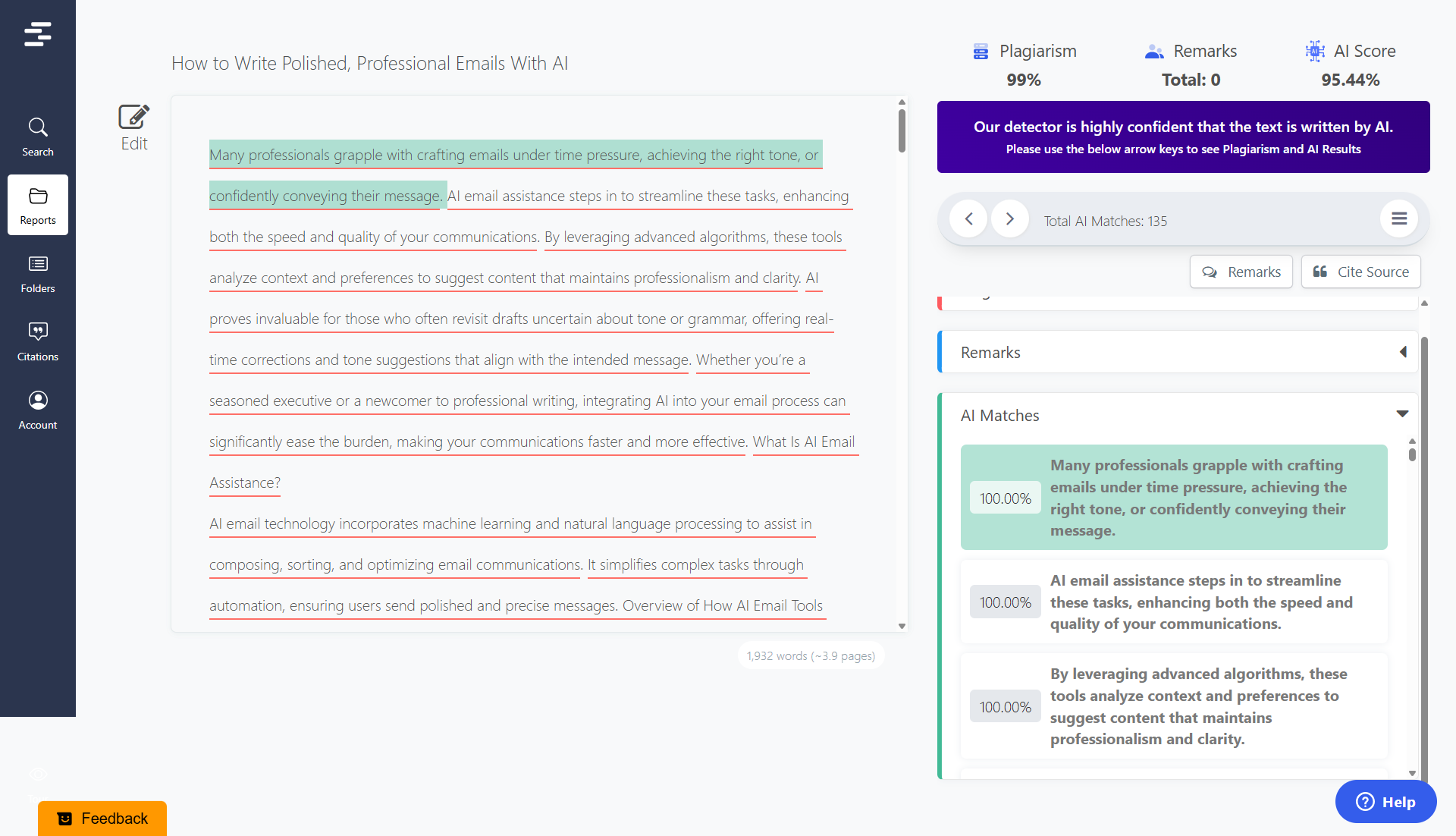
DeepSearch™ Analysis
Quetext's DeepSearch technology offers
side-by-side comparisons of AI vs. human-written
content, along with confidence scores and
readability insights helping teachers quickly
assess if a student's work matches their usual
writing style.
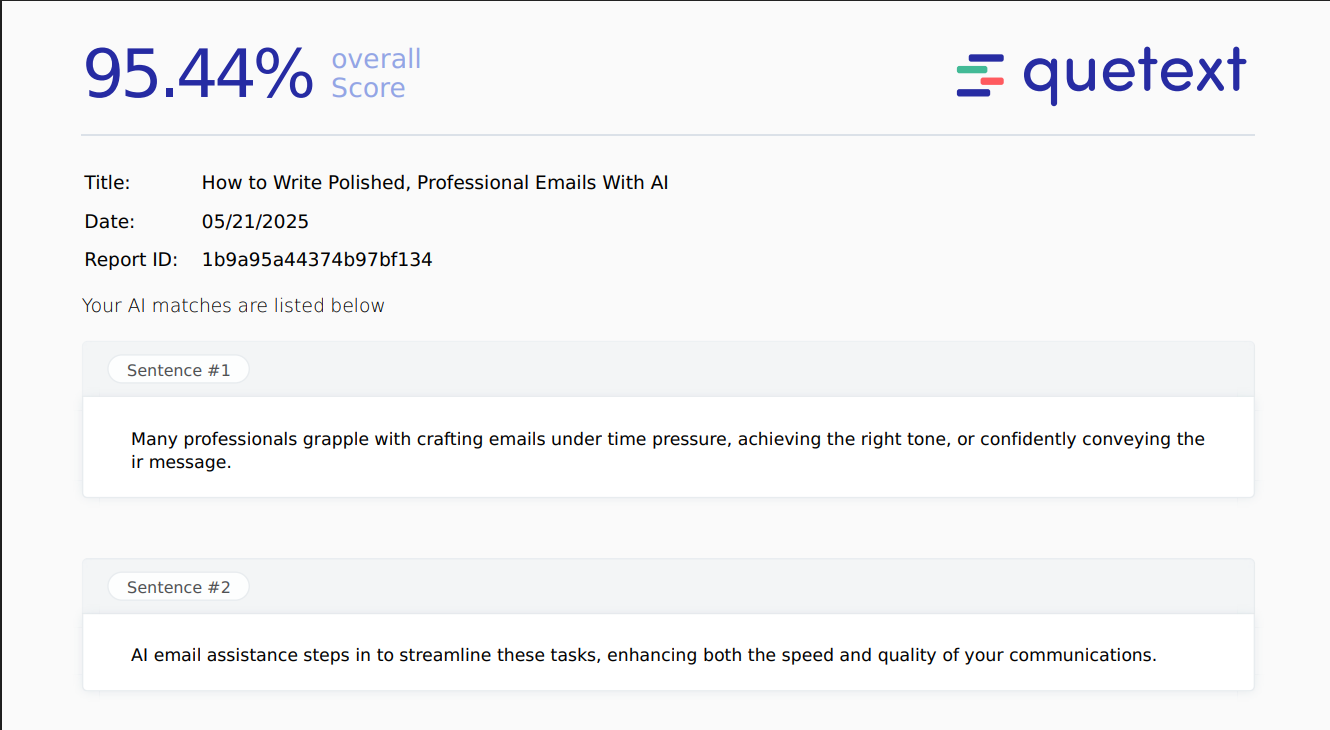
Real-Time Detection
Quickly scan essays to spot AI-generated
content that may raise concerns. Clear
reports and insights help you address
issues early and ensure fairness across all
student work.
Maintain High Academic Standards
Quetext helps educators catch AI-generated
essays and enforce school policies on
originality. By equipping teachers with clear,
data-backed reports, Quetext supports a fair
and ethical learning environment.
FAQ
What AI detector do teachers use?
How do teachers detect AI in student writing?
A detector like Quetext shows which passages look AI-written. Teachers then compare the work with the student's past and in-class writing, check the document's version history, and ask the student to explain their process.
Is there a free AI detector for teachers?
How accurate is Quetext's AI detector for Teachers?
Is 20% AI detection bad?
Can AI detectors give false positives? What about ESL students?
Can Turnitin really detect AI, and how does Quetext compare?
Can professors tell if a student used ChatGPT?
Can students trick AI detectors or use humanizers?
Can I check a whole class at once?
Does Quetext work with Canvas or Google Classroom?
Can AI detectors also check for plagiarism?
Resources

Is Using AI Content Plagiarism?
Learn where AI-generated writing fits into originality, attribution, and plagiarism checks.
Read More: Is Using AI Content Plagiarism?
How Do AI Detectors Work, And Can They Be Trusted?
A plain-language overview of how AI detection tools analyze writing patterns.
Read More: How Do AI Detectors Work, And Can They Be Trusted?
How Reliable Are AI Content Detectors? Which Is Most Reliable?
Explore what affects detector reliability and how to interpret AI-writing results responsibly.
Read More: How Reliable Are AI Content Detectors? Which Is Most Reliable?Ready to evaluate your writing?
Sign up for Quetext to unleash the power of advanced AI Detection Tools. Join thousands who trust Quetext to refine their work and assignments!