NewQuetext is now on Firefox
Check plagiarism and AI content without leaving Firefox.
Highlight text on any page, run a scan, and get instant results without switching tabs. The same DeepSearch™ engine trusted by over 10 million students, teachers, and professionals is now in your Firefox toolbar.
Add to Firefox, it’s freeUsing Chrome? Get the Chrome extension →
- Free plan: up to 1,000 words
- Plagiarism + AI detection in one scan
- Official Firefox Add-ons listing
Get started in under a minute
How to install the Quetext Firefox extension
- 01
Open the Firefox Add-ons page
Go to the Quetext listing on addons.mozilla.org and click Add to Firefox.
- 02
Approve and pin it
Confirm the permissions prompt, then pin Quetext to your toolbar from the Extensions menu.
- 03
Log in or sign up
Use your existing Quetext account, or create a free one in seconds.
- 04
Highlight any text
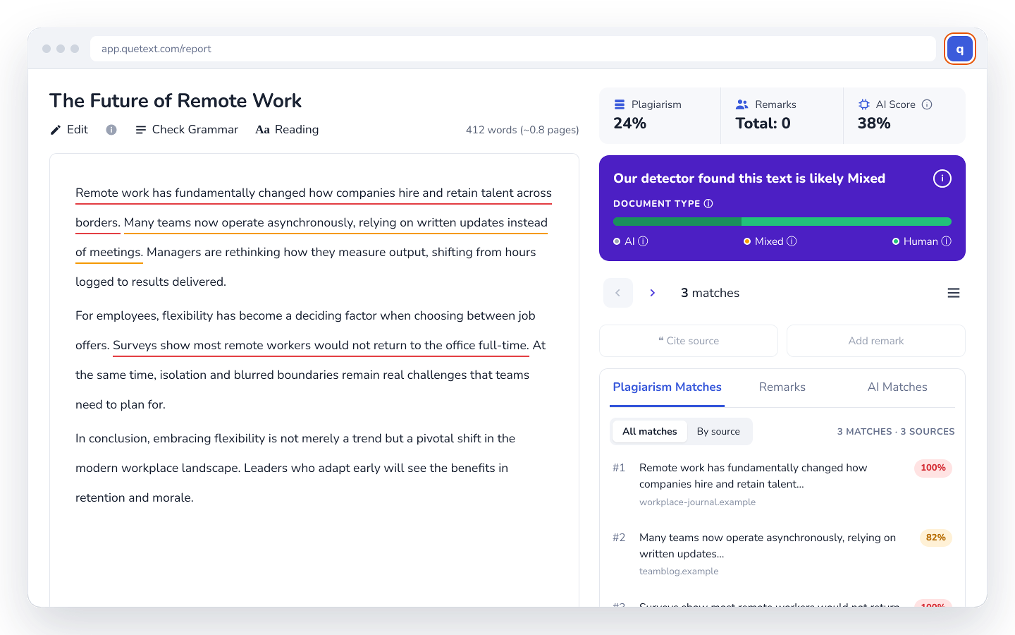
Select a paragraph on any webpage, such as a blog post, a student submission or client copy.
- 05
Run the scan
Click the Quetext icon and choose Check Plagiarism or check for AI content.
- 06
Review and fix
See flagged passages color-coded with sources side by side, and fix them right away.
Everything from Quetext, in your toolbar
Verify content without interrupting your workflow
Same engine, same database, same accuracy as the full Quetext platform. The only difference is where you start the scan.
DeepSearch™ plagiarism detection
Catches exact copies and cleverly reworded text with Contextual Analysis, Fuzzy Matching and Conditional Scoring.
AI content detection
Identify text from ChatGPT, Gemini and other LLMs with a clear AI Score, flagged alongside plagiarism results.
ColorGrade™ feedback
Exact matches, near matches, paraphrased content and AI-flagged sections, each clearly marked with sources side by side.
Grammar & citations
Grammar checking in 6 dialects of English and 9 more languages, plus MLA, APA and Chicago citations.
Under the hood
How DeepSearch™ works in Firefox
Every scan you run in Firefox goes through the same three-step process that powers Quetext’s full plagiarism checker and AI Content Detector
Explore our technology →Contextual Analysis
Looks beyond individual words to the context of phrases, catching plagiarism even when wording has been rearranged or lightly edited.
Fuzzy Matching
Flags synonym swaps, sentence restructuring and patchwork plagiarism that simpler tools miss.
Conditional Scoring
Weights each flagged passage against your overall score for a nuanced percentage, not a simple pass/fail.
Who is the Firefox extension for?
Students
Check your sources, keep the work original and generate citations when needed.
Teachers & professors
Review student work and spot plagiarism and AI use in assignments.
Copywriters & marketers
Audit your content and verify submissions before they go to clients.
Bloggers & SEOs
Avoid duplicate content and check competitor pages to keep up with best SEO practices.
Researchers
Validate your research sources and scan academic material before publishing.
One account. Your browser of choice.
Firefox New
Plagiarism and AI checks from the Firefox toolbar. Available on Firefox Add-ons.
Add to FirefoxMicrosoft Edge
Plagiarism and AI checks from the Edge toolbar. Available on Microsoft Edge Add-ons.
Get the Edge extensionAny browser
Use the full Quetext plagiarism checker and AI detector on the web, anywhere.
Open QuetextFirefox extension FAQ
How do I check for plagiarism in Firefox?
How do I install the Quetext Firefox extension?
Is the Quetext Firefox extension free?
Can I detect AI-generated content in Firefox?
Is the Firefox extension the same as the Chrome extension?
Do I need a Quetext account to use the Firefox extension?
What if I need to check more than 1,000 words?
Does the Firefox extension work on Google Docs?
Which languages does the Firefox extension support?
How accurate is the Firefox extension compared with quetext.com?
Can I generate citations from the Firefox extension?
Can I check multiple documents at once?
Is Quetext available in other browsers?
Write with confidence, right in Firefox.
Install free in seconds. Upgrade anytime for higher limits and access to all features.